Parking Finder
The Parking Finder system is a smart parking solution designed to help drivers efficiently locate available
Loading...
Searching...
No Matches
find_distance.ROIEditor Class Reference

Interactive polygon editor for defining parking spot ROIs at runtime. More...

Public Member Functions

 __init__ (self)
str active_cam (self)
 mouse_cb (self, event, x, y, flags, param)
bool handle_key (self, int key)
 draw_overlay (self, np.ndarray canvas)

Public Attributes

bool editor_mode = False
list points = []
tuple mouse_pos = (0, 0)
int cam_panel_idx = 0

Static Public Attributes

tuple POINT_COLOR = (0, 255, 255)
tuple LINE_COLOR = (0, 200, 255)
tuple CLOSE_COLOR = (180, 0, 255)
tuple FILL_COLOR = (0, 180, 255)
tuple CURSOR_COLOR = (200, 200, 200)
tuple TEXT_COLOR = (255, 255, 255)
tuple SHADOW_COLOR = (0, 0, 0)

Protected Member Functions

str _next_id (self, str cam)
 _finish_polygon (self)

Protected Attributes

dict _spot_counters = {c: len(ROIS.get(c, [])) for c in CAM_ORDER}

Detailed Description

Interactive polygon editor for defining parking spot ROIs at runtime.

Lives entirely in the display thread — all methods are called from display_loop() and are not thread-safe. The editor is toggled on/off by pressing I in the display window. While active, the user left-clicks to place polygon vertices on the active camera panel, then presses Enter to print the completed polygon's coordinates to the terminal in a copy-pasteable format for hardcoding into ROIS.

Tab cycles between camera panels so both Left and Right ROIs can be defined without restarting. Points are stored in panel-local coordinates and converted to stitched-window coordinates only for rendering.

Note
This editor does NOT automatically apply the polygon to ROIS/SPOT_MASK. Copy the printed output into the ROIS constant at the top of the file.
Interactive polygon editor. Lives entirely in the display thread.

Controls (active when editor_mode=True):
    Left click   - add point
    Right click  - undo last point
    Enter        - finish polygon, print to terminal
    Backspace    - clear current polygon
    Tab          - cycle active camera
    I            - toggle editor on/off

Definition at line 832 of file find_distance.py.

Constructor & Destructor Documentation

◆ __init__()

find_distance.ROIEditor.__init__ ( self)

Definition at line 853 of file find_distance.py.

853 def __init__(self):
854 self.editor_mode: bool = False
855 self.points: list[tuple[int, int]] = []
856 self.mouse_pos: tuple[int, int] = (0, 0)
857 # Which camera panel the user is editing (index into DISPLAY_ORDER)
858 self.cam_panel_idx: int = 0
859 # Running count per camera so auto-IDs don't repeat within a session
860 self._spot_counters: dict[str, int] = {c: len(ROIS.get(c, [])) for c in CAM_ORDER}
861

Member Function Documentation

◆ _finish_polygon()

find_distance.ROIEditor._finish_polygon ( self)
protected

Definition at line 943 of file find_distance.py.

943 def _finish_polygon(self):
944 if len(self.points) < 3:
945 print(f"[ROI Editor] Need at least 3 points (have {len(self.points)})")
946 return
947
948 cam = self.active_cam
949 sid = self._next_id(cam)
950 poly = list(self.points)
951
952 print(f"\n# ── ROI output ──────────────────────────────────────────")
953 print(f"# Camera : {cam} ID : {sid}")
954 print(f"{{'id': '{sid}', 'poly': {poly}}},")
955 print(f"# ─────────────────────────────────────────────────────────\n")
956
957 self.points.clear()
958
Here is the caller graph for this function:

◆ _next_id()

str find_distance.ROIEditor._next_id ( self,
str cam )
protected

Definition at line 868 of file find_distance.py.

868 def _next_id(self, cam: str) -> str:
869 self._spot_counters[cam] += 1
870 prefix = cam[0].upper()
871 return f"{prefix}{self._spot_counters[cam]}"
872
Here is the caller graph for this function:

◆ active_cam()

str find_distance.ROIEditor.active_cam ( self)

Definition at line 865 of file find_distance.py.

865 def active_cam(self) -> str:
866 return CAM_ORDER[DISPLAY_ORDER[self.cam_panel_idx]]
867
Here is the caller graph for this function:

◆ draw_overlay()

find_distance.ROIEditor.draw_overlay ( self,
np.ndarray canvas )

Definition at line 959 of file find_distance.py.

959 def draw_overlay(self, canvas: np.ndarray):
960 if not self.editor_mode:
961 return
962
963 num_panels = len(DISPLAY_ORDER)
964 panel_w = DISP_W
965 col_start = self.cam_panel_idx * panel_w
966
967 # ── translucent panel highlight ───────────────────────────────────────
968 overlay = canvas.copy()
969 cv2.rectangle(overlay, (col_start, 0), (col_start + panel_w, DISP_H),
970 (0, 60, 100), -1)
971 cv2.addWeighted(overlay, 0.15, canvas, 0.85, 0, canvas)
972
973 mx, my = self.mouse_pos
974 cv2.line(canvas, (mx, 0), (mx, DISP_H), self.CURSOR_COLOR, 1, cv2.LINE_AA)
975 cv2.line(canvas, (0, my), (canvas.shape[1], my), self.CURSOR_COLOR, 1, cv2.LINE_AA)
976
977 canvas_pts = [(col_start + px, py) for (px, py) in self.points]
978
979 if len(canvas_pts) >= 3:
980 fill_overlay = canvas.copy()
981 cv2.fillPoly(fill_overlay,
982 [np.array(canvas_pts, dtype=np.int32)],
983 self.FILL_COLOR)
984 cv2.addWeighted(fill_overlay, 0.25, canvas, 0.75, 0, canvas)
985
986 for i in range(1, len(canvas_pts)):
987 cv2.line(canvas, canvas_pts[i - 1], canvas_pts[i],
988 self.LINE_COLOR, 2, cv2.LINE_AA)
989
990 if len(canvas_pts) >= 3:
991 p0, pn = canvas_pts[0], canvas_pts[-1]
992
993 dx = p0[0] - pn[0];
994 dy = p0[1] - pn[1]
995 dist = max(1, int((dx ** 2 + dy ** 2) ** 0.5))
996 segs = max(4, dist // 10)
997 for s in range(segs):
998 if s % 2 == 0:
999 t0 = s / segs
1000 t1 = (s + 1) / segs
1001 pt0 = (int(pn[0] + dx * t0), int(pn[1] + dy * t0))
1002 pt1 = (int(pn[0] + dx * t1), int(pn[1] + dy * t1))
1003 cv2.line(canvas, pt0, pt1, self.CLOSE_COLOR, 2, cv2.LINE_AA)
1004
1005 for idx, (cx, cy) in enumerate(canvas_pts):
1006 cv2.circle(canvas, (cx, cy), 5, self.POINT_COLOR, -1, cv2.LINE_AA)
1007 cv2.circle(canvas, (cx, cy), 5, (0, 0, 0), 1, cv2.LINE_AA)
1008 lbl = str(idx)
1009 (tw, th), _ = cv2.getTextSize(lbl, cv2.FONT_HERSHEY_SIMPLEX, 0.4, 1)
1010 cv2.putText(canvas, lbl, (cx + 7, cy + 4),
1011 cv2.FONT_HERSHEY_SIMPLEX, 0.4, self.SHADOW_COLOR, 2, cv2.LINE_AA)
1012 cv2.putText(canvas, lbl, (cx + 7, cy + 4),
1013 cv2.FONT_HERSHEY_SIMPLEX, 0.4, self.POINT_COLOR, 1, cv2.LINE_AA)
1014
1015 hud_lines = [
1016 f"ROI EDITOR | cam: {self.active_cam} | pts: {len(self.points)}",
1017 "LClick=add RClick=undo Enter=done Bksp=clear Tab=cam I=exit",
1018 ]
1019 for li, line in enumerate(hud_lines):
1020 yy = DISP_H - 12 - (len(hud_lines) - 1 - li) * 18
1021 (tw, th), _ = cv2.getTextSize(line, cv2.FONT_HERSHEY_SIMPLEX, 0.45, 1)
1022 cv2.rectangle(canvas,
1023 (col_start + 4, yy - th - 4),
1024 (col_start + tw + 10, yy + 4),
1025 (10, 10, 10), -1)
1026 cv2.putText(canvas, line,
1027 (col_start + 7, yy),
1028 cv2.FONT_HERSHEY_SIMPLEX, 0.45, self.TEXT_COLOR, 1, cv2.LINE_AA)
1029
1030 if col_start <= mx < col_start + panel_w:
1031 lx = mx - col_start
1032 tip = f"({lx}, {my})"
1033 (tw, th), _ = cv2.getTextSize(tip, cv2.FONT_HERSHEY_SIMPLEX, 0.4, 1)
1034 tx = min(mx + 10, canvas.shape[1] - tw - 6)
1035 ty = max(my - 10, th + 4)
1036 cv2.rectangle(canvas, (tx - 2, ty - th - 2), (tx + tw + 2, ty + 2),
1037 (20, 20, 20), -1)
1038 cv2.putText(canvas, tip, (tx, ty),
1039 cv2.FONT_HERSHEY_SIMPLEX, 0.4, self.TEXT_COLOR, 1, cv2.LINE_AA)
1040
1041

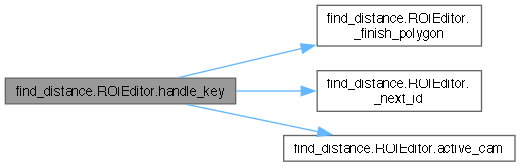
◆ handle_key()

bool find_distance.ROIEditor.handle_key ( self,
int key )
Process a keypress.
Returns True if the key was consumed (caller should not process further).
Returns False if the key should be handled by the normal display loop.

Definition at line 902 of file find_distance.py.

902 def handle_key(self, key: int) -> bool:
903 """
904 Process a keypress.
905 Returns True if the key was consumed (caller should not process further).
906 Returns False if the key should be handled by the normal display loop.
907 """
908 if key == ord('i') or key == ord('I'):
909 self.editor_mode = not self.editor_mode
910 if self.editor_mode:
911 print(f"\n[ROI Editor] ON — camera: {self.active_cam}")
912 print(" Left-click to add points | Right-click to undo")
913 print(" Enter = finish polygon | Backspace = clear")
914 print(" Tab = switch camera | I = exit editor\n")
915 else:
916 print("[ROI Editor] OFF")
917 self.points.clear()
918 return True
919
920 if not self.editor_mode:
921 return False
922
923 # Enter — finish polygon
924 if key in (13, 10): # CR or LF
925 self._finish_polygon()
926 return True
927
928 # Backspace — clear
929 if key == 8:
930 self.points.clear()
931 print("[ROI Editor] Points cleared")
932 return True
933
934 # Tab — cycle camera
935 if key == 9:
936 self.cam_panel_idx = (self.cam_panel_idx + 1) % len(DISPLAY_ORDER)
937 self.points.clear()
938 print(f"[ROI Editor] Active camera: {self.active_cam} (points cleared)")
939 return True
940
941 return False
942
Here is the call graph for this function:

◆ mouse_cb()

find_distance.ROIEditor.mouse_cb ( self,
event,
x,
y,
flags,
param )
OpenCV mouse callback (runs in display thread).

Definition at line 875 of file find_distance.py.

875 def mouse_cb(self, event, x, y, flags, param):
876 """OpenCV mouse callback (runs in display thread)."""
877 if not self.editor_mode:
878 return
879
880 # x is in the stitched window; clamp to the active panel column
881 panel_w = DISP_W
882 # left panel = DISPLAY_ORDER[0], right panel = DISPLAY_ORDER[1]
883 # we only care about the panel that matches self.cam_panel_idx
884 col_start = self.cam_panel_idx * panel_w
885 col_end = col_start + panel_w
886
887 # Track mouse regardless of which panel (for crosshair)
888 self.mouse_pos = (x, y)
889
890 if event == cv2.EVENT_LBUTTONDOWN:
891 if col_start <= x < col_end:
892 # Convert to panel-local coordinates
893 lx = x - col_start
894 self.points.append((lx, y))
895
896 elif event == cv2.EVENT_RBUTTONDOWN:
897 if self.points:
898 self.points.pop()
899

Member Data Documentation

◆ _spot_counters

dict find_distance.ROIEditor._spot_counters = {c: len(ROIS.get(c, [])) for c in CAM_ORDER}
protected

Definition at line 860 of file find_distance.py.

◆ cam_panel_idx

int find_distance.ROIEditor.cam_panel_idx = 0

Definition at line 858 of file find_distance.py.

◆ CLOSE_COLOR

find_distance.ROIEditor.CLOSE_COLOR = (180, 0, 255)
static

Definition at line 847 of file find_distance.py.

◆ CURSOR_COLOR

find_distance.ROIEditor.CURSOR_COLOR = (200, 200, 200)
static

Definition at line 849 of file find_distance.py.

◆ editor_mode

bool find_distance.ROIEditor.editor_mode = False

Definition at line 854 of file find_distance.py.

◆ FILL_COLOR

find_distance.ROIEditor.FILL_COLOR = (0, 180, 255)
static

Definition at line 848 of file find_distance.py.

◆ LINE_COLOR

find_distance.ROIEditor.LINE_COLOR = (0, 200, 255)
static

Definition at line 846 of file find_distance.py.

◆ mouse_pos

tuple find_distance.ROIEditor.mouse_pos = (0, 0)

Definition at line 856 of file find_distance.py.

◆ POINT_COLOR

find_distance.ROIEditor.POINT_COLOR = (0, 255, 255)
static

Definition at line 845 of file find_distance.py.

◆ points

find_distance.ROIEditor.points = []

Definition at line 855 of file find_distance.py.

◆ SHADOW_COLOR

find_distance.ROIEditor.SHADOW_COLOR = (0, 0, 0)
static

Definition at line 851 of file find_distance.py.

◆ TEXT_COLOR

find_distance.ROIEditor.TEXT_COLOR = (255, 255, 255)
static

Definition at line 850 of file find_distance.py.


The documentation for this class was generated from the following file: